#define _USE_MATH_DEFINES
#define GLM_ENABLE_EXPERIMENTAL

#include <iostream>
#include <glm/glm.hpp>
#include <glm/gtc/matrix_transform.hpp>
#include <glm/gtx/string_cast.hpp>
#include <fstream>
#include <chrono>

#include <vector>

#include "cow.h"
#include "ppm_io.h"


void convertNDCtoImage(const glm::vec4 vertexNDC, glm::vec4 vertexView, const uint32_t& imageWidth, const uint32_t& imageHeight, glm::vec3& vertexRaster)
{
    vertexRaster.x = ((vertexNDC.x + 1.0f) / 2.0f) * imageWidth;
    vertexRaster.y = ((1.0f - vertexNDC.y) * 0.5f) * imageHeight;
    vertexRaster.z = -vertexView.z;
}


float min3(const float& a, const float& b, const float& c)
{
    return std::min(a, std::min(b, c));
}

float max3(const float& a, const float& b, const float& c)
{
    return std::max(a, std::max(b, c));
}


bool edge(const glm::vec3& a, const glm::vec3& b, const glm::vec3& c)
{
    return (c.x - a.x) * (b.y - a.y) - (c.y - a.y) * (b.x - a.x) >= 0;
    // return 1.0f;
}

glm::mat4 lookAt(glm::vec3 campos, glm::vec3 look, glm::vec3 up)
{
    glm::vec3 zaxis = glm::normalize(campos - look);
    glm::vec3 xaxis = glm::normalize(glm::cross(up, zaxis));
    glm::vec3 yaxis = glm::cross(zaxis, xaxis);

    glm::mat4 view = {
        { xaxis.x, yaxis.x, zaxis.x, 0 },
        { xaxis.y, yaxis.y, zaxis.y, 0 },
        { xaxis.z, yaxis.z, zaxis.z, 0 },
        { -glm::dot(xaxis, campos), -glm::dot(yaxis, campos), -glm::dot(zaxis, campos), 1 }
    };

    return view;
}

glm::mat4 perspective(float fovy, float aspect, float near, float far)
{
	glm::mat4 pro_matrix =
	{
		{ 1/(aspect * std::tan(glm::radians(fovy/2))), 0, 0, 0 },
		{ 0, 1 / std::tan(glm::radians(fovy/2)), 0, 0 },
		{ 0 , 0, -((far + near) / (far - near)), -1 },
		{ 0, 0, -2.0f*((far*near)/(far-near)), 0 }
	};
	return pro_matrix;
}

const uint32_t imageWidth = 640;
const uint32_t imageHeight = 480;


const uint32_t ntris = 3156;
const float nearClippingPlane = 1;
const float farClippingPLane = 1000;


int main(int argc, char** argv)
{

    glm::mat4 worldToCamera = glm::lookAt(glm::vec3(20, 10, 20), glm::vec3(0, 5, 0), glm::vec3(0, 1, 0));

    float t, b, l, r;

    PPM ppmOut;
    ppmOut.setBinary(true);


    struct rgb
    {
        uint8_t r, g, b;
    };

    std::vector <rgb>  frameBuffer;
    frameBuffer.resize(imageWidth * imageHeight);


    for (uint32_t i = 0; i < imageWidth * imageHeight; ++i) {
        frameBuffer[i].r = 0;
        frameBuffer[i].g = 0;
        frameBuffer[i].b = 0;
    }

    float* depthBuffer = new float[imageWidth * imageHeight];

    for (uint32_t i = 0; i < imageWidth * imageHeight; ++i) {
        depthBuffer[i] = farClippingPLane;
    }

    auto t_start = std::chrono::high_resolution_clock::now();

    for (uint32_t i = 0; i < ntris; ++i) {

        // 삼각형 만들기 = model coordinate
        const glm::vec3& v0 = vertices[nvertices[i * 3]];
        const glm::vec3& v1 = vertices[nvertices[i * 3 + 1]];
        const glm::vec3& v2 = vertices[nvertices[i * 3 + 2]];


        // 모델 행렬 = 로컬 -> 뷰
        glm::mat4 modelMatrix(1.0f);
        // 글로벌 -> 카메라
        glm::mat4 viewMatrix = lookAt(glm::vec3(0, 50, 10), glm::vec3(0, 5, 0), glm::vec3(0, 1, 0));
        // 로컬 -> 카메라
        glm::mat4 modelViewMatrix = viewMatrix * modelMatrix;

        //Camera(view) coordinates
        glm::vec4 v0e;
        glm::vec4 v1e;
        glm::vec4 v2e;

        //Code here (calculate v0e, v1e, v2e here)
        v0e = modelViewMatrix * glm::vec4(v0, 1.0f);
        v1e = modelViewMatrix * glm::vec4(v1, 1.0f);
        v2e = modelViewMatrix * glm::vec4(v2, 1.0f);

        // std::cout << glm::to_string(v0e) << "\n" << glm::to_string(v1e) << "\n" << glm::to_string(v2e) << "\n\n";

        glm::mat4 projection = perspective((45.0f), imageWidth / (float)imageHeight, nearClippingPlane, farClippingPLane);


        //Clip coodinates
        glm::vec4 v0c, v1c, v2c;

        // clip = projection * view
        //Code here (calculate v0c, v1c, v2c here)
        v0c = projection * v0e;
        v1c = projection * v1e;
        v2c = projection * v2e;
        // std::cout << glm::to_string(v0c) << "\n" << glm::to_string(v1c) << "\n" << glm::to_string(v2c) << "\n\n";

        //Perspective division (divide v0c.x, v0c.y, v0c.z by v0c.w   (same to v1c, v2c)

        glm::vec4 v0p = v0c;
        glm::vec4 v1p = v1c;
        glm::vec4 v2p = v2c;

        //Code here
        // 모든 좌표값음 -1 ~ 1로 바꿈 = NDC
        v0p /= v0c.w;
        v1p /= v1c.w;
        v2p /= v2c.w;


        glm::vec3 v0Raster, v1Raster, v2Raster;
        convertNDCtoImage(v0p, v0e, imageWidth, imageHeight, v0Raster);
        convertNDCtoImage(v1p, v1e, imageWidth, imageHeight, v1Raster);
        convertNDCtoImage(v2p, v2e, imageWidth, imageHeight, v2Raster);

        // std::cout << glm::to_string(v0Raster) << "\n" << glm::to_string(v1Raster) << "\n" << glm::to_string(v2Raster) << "\n\n";

        //bound box
        float xmin = min3(v0Raster.x, v1Raster.x, v2Raster.x);
        float ymin = min3(v0Raster.y, v1Raster.y, v2Raster.y);
        float xmax = max3(v0Raster.x, v1Raster.x, v2Raster.x);
        float ymax = max3(v0Raster.y, v1Raster.y, v2Raster.y);

        if (xmin > imageWidth - 1 || xmax < 0 || ymin > imageHeight - 1 || ymax < 0) continue;

        uint32_t x0 = std::max(int32_t(0), (int32_t)(std::floor(xmin)));
        uint32_t x1 = std::min(int32_t(imageWidth) - 1, (int32_t)(std::floor(xmax)));
        uint32_t y0 = std::max(int32_t(0), (int32_t)(std::floor(ymin)));
        uint32_t y1 = std::min(int32_t(imageHeight) - 1, (int32_t)(std::floor(ymax)));


        //calculat the area of triangle  (area)
        float area = edge(v0Raster, v1Raster, v2Raster);

        for (uint32_t y = y0; y <= y1; ++y) {
            for (uint32_t x = x0; x <= x1; ++x) {

                glm::vec3 pixelSample(x + 0.5, y + 0.5, 0);

                //calculate the areas of  three suvdivided triangles

                bool w0 = edge(v1Raster, v2Raster, pixelSample); //w0
                bool w1 = edge(v2Raster, v0Raster, pixelSample); //w1
                bool w2 = edge(v0Raster, v1Raster, pixelSample); //w2


                if (w0 >= 0 && w1 >= 0 && w2 >= 0) { //inside


                    //calculate the ratio here
                    w0 /= area;
                    w1 /= area;
                    w2 /= area;

                    //calculate the z of pixelSample
                    float z;


                    //code here


                    if (z < depthBuffer[y * imageWidth + x]) {

                        depthBuffer[y * imageWidth + x] = z;


                        //calculate normal vector from v0e, v1e, v2e

                        glm::vec3 n;


                        frameBuffer[y * imageWidth + x].r = n.x * 255;
                        frameBuffer[y * imageWidth + x].g = n.y * 255;
                        frameBuffer[y * imageWidth + x].b = n.z * 255;
                    }
                }
                // frameBuffer[y * imageWidth + x].r = 255;
                // frameBuffer[y * imageWidth + x].g = 255;
                // frameBuffer[y * imageWidth + x].b = 255;
            } // 안쪽 for loop
        }
    } // 바깥쪽 for loop

    auto t_end = std::chrono::high_resolution_clock::now();
    auto passedTime = std::chrono::duration<double, std::milli>(t_end - t_start).count();
    std::cerr << "Wall passed time: " << passedTime << "ms" << std::endl;


    rgb* p = frameBuffer.data();

    ppmOut.load(&p[0].r, imageHeight, imageWidth, 255, "P6");
    ppmOut.write("../../output.ppm");

    delete[] depthBuffer;

    return 0;
}
에서
for (uint32_t y = y0; y <= y1; ++y) {
for (uint32_t x = x0; x <= x1; ++x) {
안쪽을 구현한다
이때 사용되는 것이 Barycentric 좌표를 사용한다
Barycentric 좌표란 한 점이 각 점에서 얼마나 떨어져 있는가에 대한 이야기를 하는 것이다

예를 들면, P에 대해서 생각할때 P는 어디쪽에 가중치가 더 높을까? 그리고 그것을 어떻게 표현할까? 라는 것이다
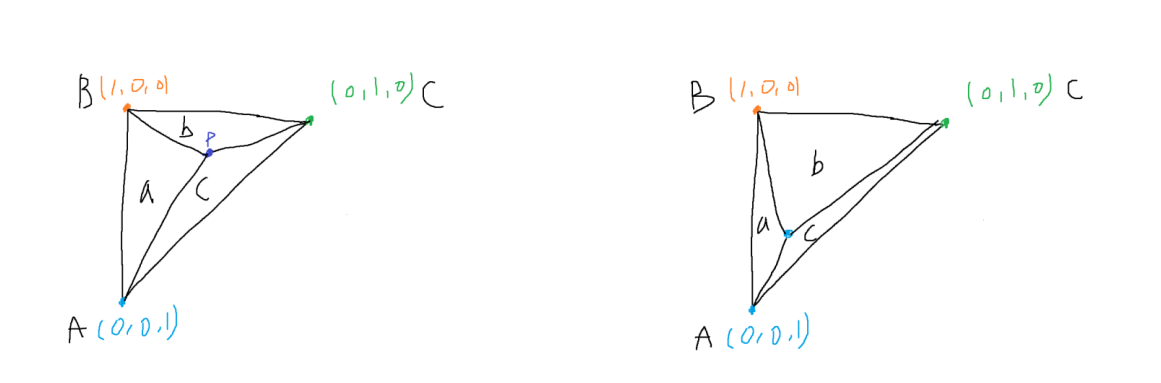
당연히 P가 어디에 있는가에 따라 각 가중치가 달라지게 된다
이때 Barycentric 좌표는 삼각형의 3개 면적을 같게 하는 것을 목표로 하는 한 점 P를 구하는 것이다

이때 삼각형의 전체 면적을 D라고 했을시 해당 수식으로 나타낼 수 있다
// 세개의 꼭짓점으로 이루어진 삼각형 면적
float area(const glm::vec3 a, const glm::vec3 b, const glm::vec3 c)
{
    return fabs((c[0] - a[0]) * (b[1] - a[1]) - (c[1] - a[1]) * (b[0] - a[0]));
}
이를 코드상에서 구하기 위해 삼각형 면적을 구하는 함수를 작성 후
        //calculat the area of triangle  (area)
        float total = area(v0Raster, v1Raster, v2Raster);

        for (uint32_t y = y0; y <= y1; ++y) {
            for (uint32_t x = x0; x <= x1; ++x) {

                glm::vec3 pixelSample(x + 0.5, y + 0.5, 0);

                //calculate the areas of  three suvdivided triangles

                bool w0 = edge(v1Raster, v2Raster, pixelSample); //w0
                bool w1 = edge(v2Raster, v0Raster, pixelSample); //w1
                bool w2 = edge(v0Raster, v1Raster, pixelSample); //w2

                if (w0 >= true && w1 >= true && w2 >= true) { //inside

                    float a2 = area(v0Raster, v1Raster, pixelSample);
                    float a0 = area(v1Raster, v2Raster, pixelSample);
                    float a1 = area(v2Raster, v0Raster, pixelSample);
                    //Barycentric 좌표
                    a0 /= total;
                    a1 /= total;
                    a2 /= total;
면적으로 나누어서 Barycentric 좌표를 구해준다
                    frameBuffer[y * imageWidth + x].r = 255;
                    frameBuffer[y * imageWidth + x].g = 0;
                    frameBuffer[y * imageWidth + x].b = 0;
임시로 모든 픽셀을 255, 0, 0으로 하여 모든 색을 red로 고정한 후 출력한다

보정이 잘 되서 나오는 것을 임시로 확인할 수 있다
이제 3d모델의 앞뒤를 확인하기 위해서 카메라와 물체와의 거리를 확인해야 한다
즉, 앞에 있는것 = z값이 높은것을 우선시 해서 앞으로 랜더링 해야 한다
if (w0 >= true && w1 >= true && w2 >= true) { //inside

                    float a2 = area(v0Raster, v1Raster, pixelSample);
                    float a0 = area(v1Raster, v2Raster, pixelSample);
                    float a1 = area(v2Raster, v0Raster, pixelSample);
                    //Barycentric 좌표
                    a0 /= total;
                    a1 /= total;
                    a2 /= total;


                    float oneOverZ = v0Raster.z * a0 + v1Raster.z * a1 + v2Raster.z * a2;
                    float z = 1 / oneOverZ; //이 값이 픽셀의 depth

                    //랜더링 3d모델 카메라 기준 앞인지 뒤인지 확인, 카메라와 가장 가까운지 확인 해야함
                    if (z < depthBuffer[y * imageWidth + x]) {

                        depthBuffer[y * imageWidth + x] = z;

                        //calculate normal vector from v0e, v1e, v2e
                        glm::vec3 e1 = glm::vec3(v1e - v0e);
                        glm::vec3 e2 = glm::vec3(v2e - v0e);
                        glm::vec3 n = glm::normalize(glm::cross(e1, e2)); // 카메라 노멀벡터

                        // [-1,1] → [0,1]
                        n = (n + glm::vec3(1, 1, 1)) * 0.5f;


                        frameBuffer[y * imageWidth + x].r = n.x * 255;
                        frameBuffer[y * imageWidth + x].g = n.y * 255;
                        frameBuffer[y * imageWidth + x].b = n.z * 255;
                    }
                }
각 픽셀마다 색 조정을 거치도록 해주면

형광색 소를 볼 수 있다
'공부' 카테고리의 다른 글
| 컴퓨터 구조 - 기억장치(2025 11 17) (0) | 2025.11.17 |
|---|---|
| 컴퓨터 구조 - 기억장치 모듈 설계, 캐시 메모리(2025 11 11) (0) | 2025.11.11 |
| 데이터베이스 - SQL 프로그래밍 (2025 11 10) (0) | 2025.11.10 |
| 컴퓨터 구조 - 기억장치 (2025 11 10) (0) | 2025.11.10 |
| QA - Testing (0) | 2025.11.08 |